Cake Pricing Calculator
Most home bakers charge for ingredients and forget they work for free. This workbook costs every ingredient the way you actually buy it, adds packaging, overhead, delivery and your own hourly wage, and gives you a price that hits the margin you set.
It works in any currency and in any country. Pick one of eleven currency codes on the Instructions tab, or type your own symbol, and every price label follows it. Units go both ways too: grams and millilitres alongside ounces, pounds, cups, tablespoons and teaspoons. Every result is a ratio of the numbers you type, so the arithmetic is identical whichever you choose.
€7 one-off payment · not on sale yet
What it does
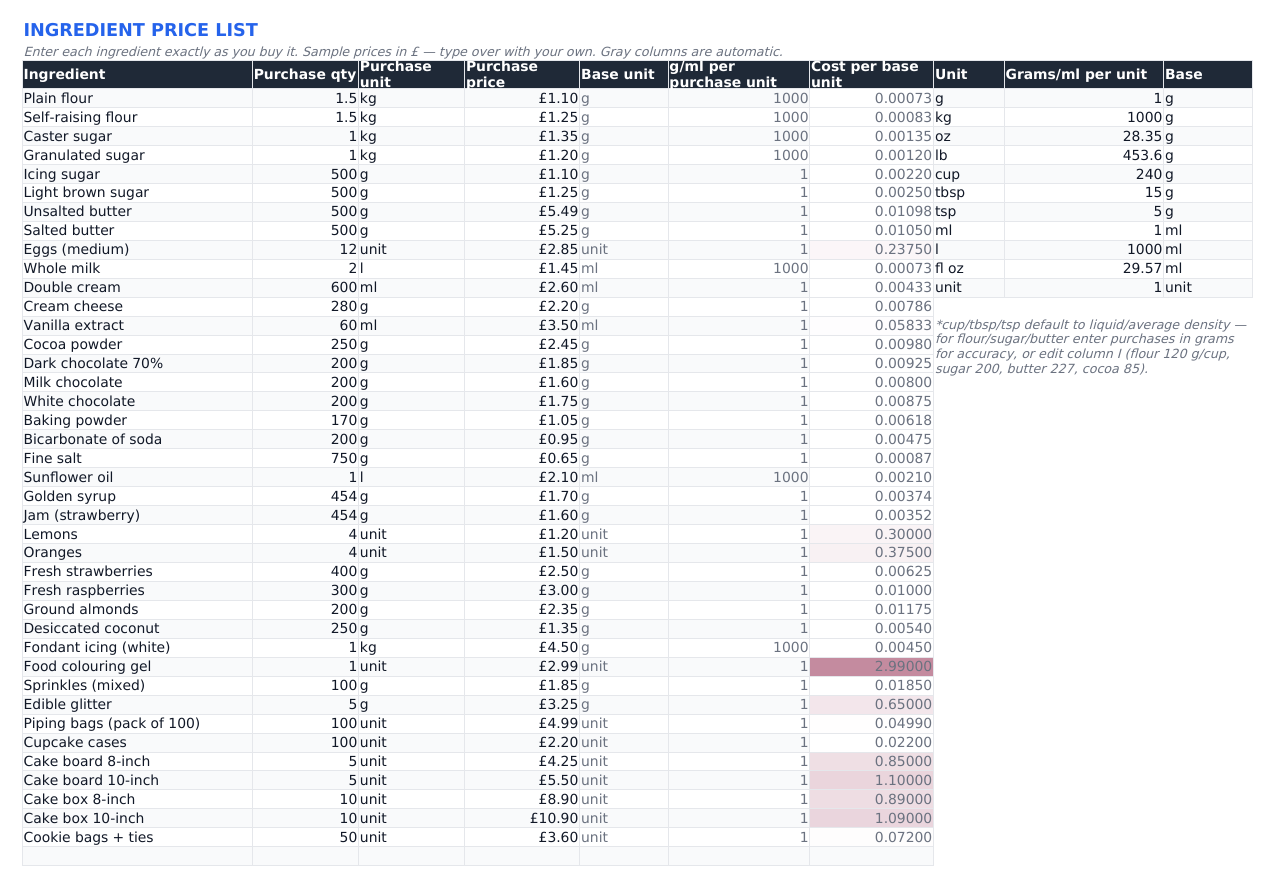
You enter each ingredient the way you bought it: a 1.5 kg bag of flour, a dozen eggs, a 500 g block of butter. The workbook turns that into a cost per gram, millilitre or unit. Then you build the recipe line by line, so a cake using 340 g of that flour is costed at 340 g rather than at a guess.
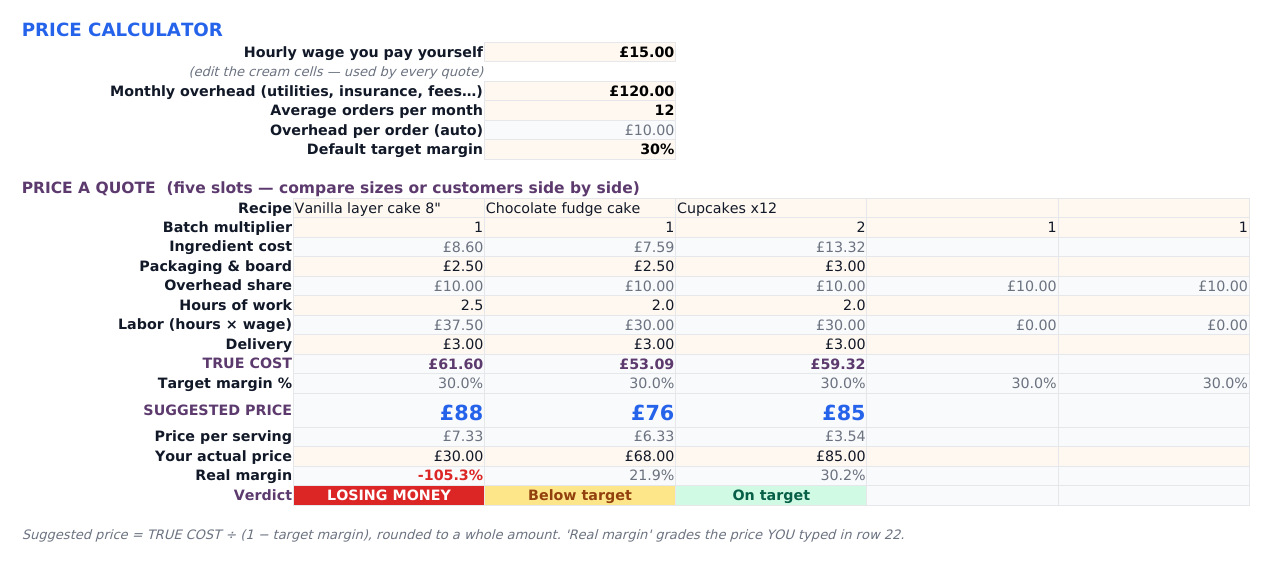
Every quote then adds the four things bakers leave out: packaging, a share of your monthly overhead, delivery, and your own hourly wage. Out comes a true cost and the price that hits your target margin. Type in the price you were going to charge and it grades that too, bluntly.
It is a spreadsheet, not an app. Nothing is uploaded and nothing expires, and every formula is there to be read.
- Automatic kg / g / oz / lb / ml / l / fl oz / cup / tbsp / tsp conversion from one editable grams-per-unit table
- Cost per recipe and cost per serving, from 20 recipe slots
- Overhead, wage, packaging, delivery and target margin folded into one price
- Five quote slots side by side for comparing sizes or customers
- Batch multipliers for tiered cakes and large cookie orders
- Order book with due-date alerts and profit per job
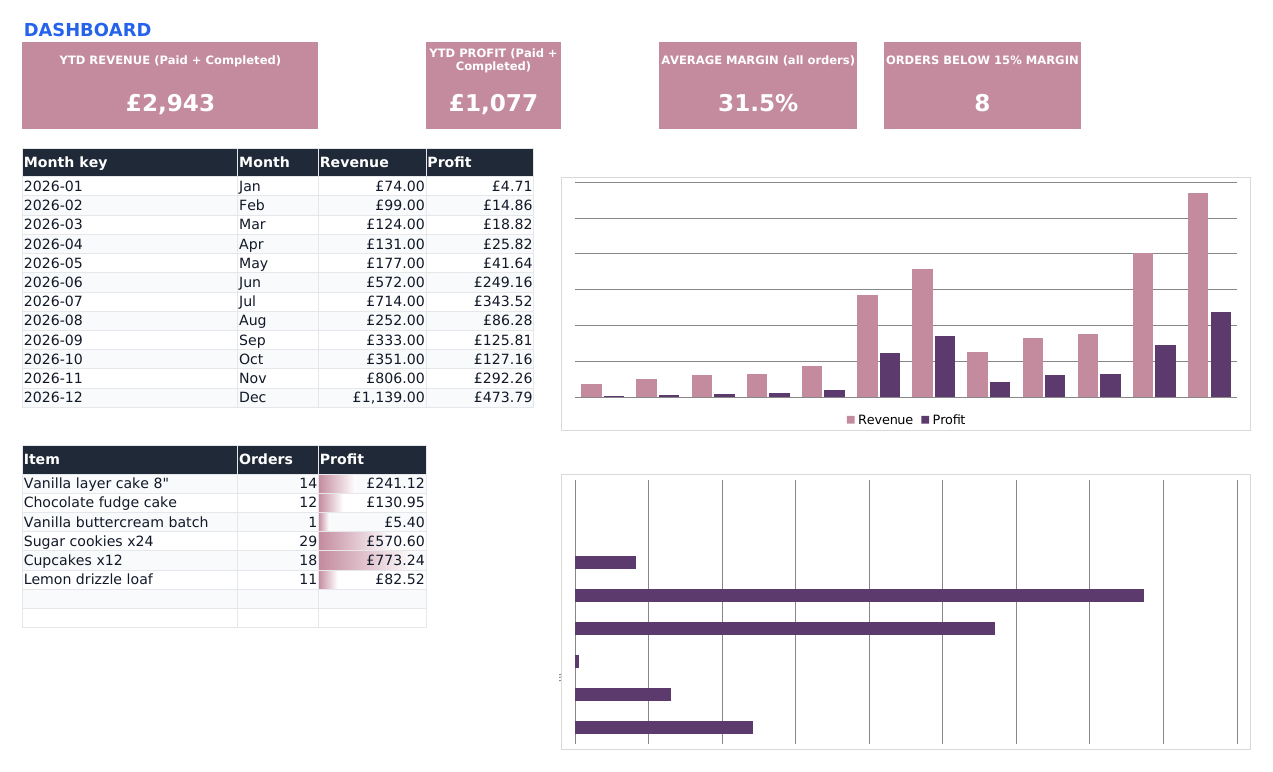
- Dashboard: revenue, profit, margin health and best-sellers
- Sample data included, clearly marked, cleared in about two minutes
The pricing formula, in full
Ingredients + packaging + overhead share + delivery + (hours × your wage) = true cost. Suggested price = true cost ÷ (1 − target margin). The Instructions tab explains why that is not the same as adding a percentage on top.
Who it is for, and who it is not for
If two lines in the right-hand column describe you, do not buy it.
A good fit if…
- You sell cakes, cupcakes, cookies or bakes from home and price by instinct
- You want to know whether a job actually made money after your time
- You can type in a spreadsheet. You will not have to write a formula
- You want your numbers on your own machine, not in someone else’s SaaS
- You are quoting weddings or tiered cakes and keep under-charging for them
Not a good fit if…
- You need VAT returns, sales tax or bookkeeping. This prices jobs; it is not accounting software
- You want invoicing, card payments or customer emails built in
- You need stock control or ingredient re-ordering
- You want a phone app. Setting this up on a small screen is miserable
- You have never opened a spreadsheet and would rather not start
What is inside, tab by tab
Six tabs. Two you set up once, the rest you use every time an order comes in.
1. Ingredients
Your master price list. Pack size, pack unit, what you paid; the sheet works out the cost per gram, millilitre or unit. It ships with 40 sample ingredients already priced. Type over them.
2. Recipes
Twenty recipe slots. Pick an ingredient, type the amount and the unit, and read the cost per recipe and per serving. Six worked sample recipes are already in there.
3. Price Calculator
Five quotes side by side. Each takes a recipe, a batch multiplier and your hours, then adds packaging, overhead, delivery and wage to give a true cost, a suggested price and a price per serving. Type in the price you were going to charge and it grades it: losing money, below target, on target.
4. Orders
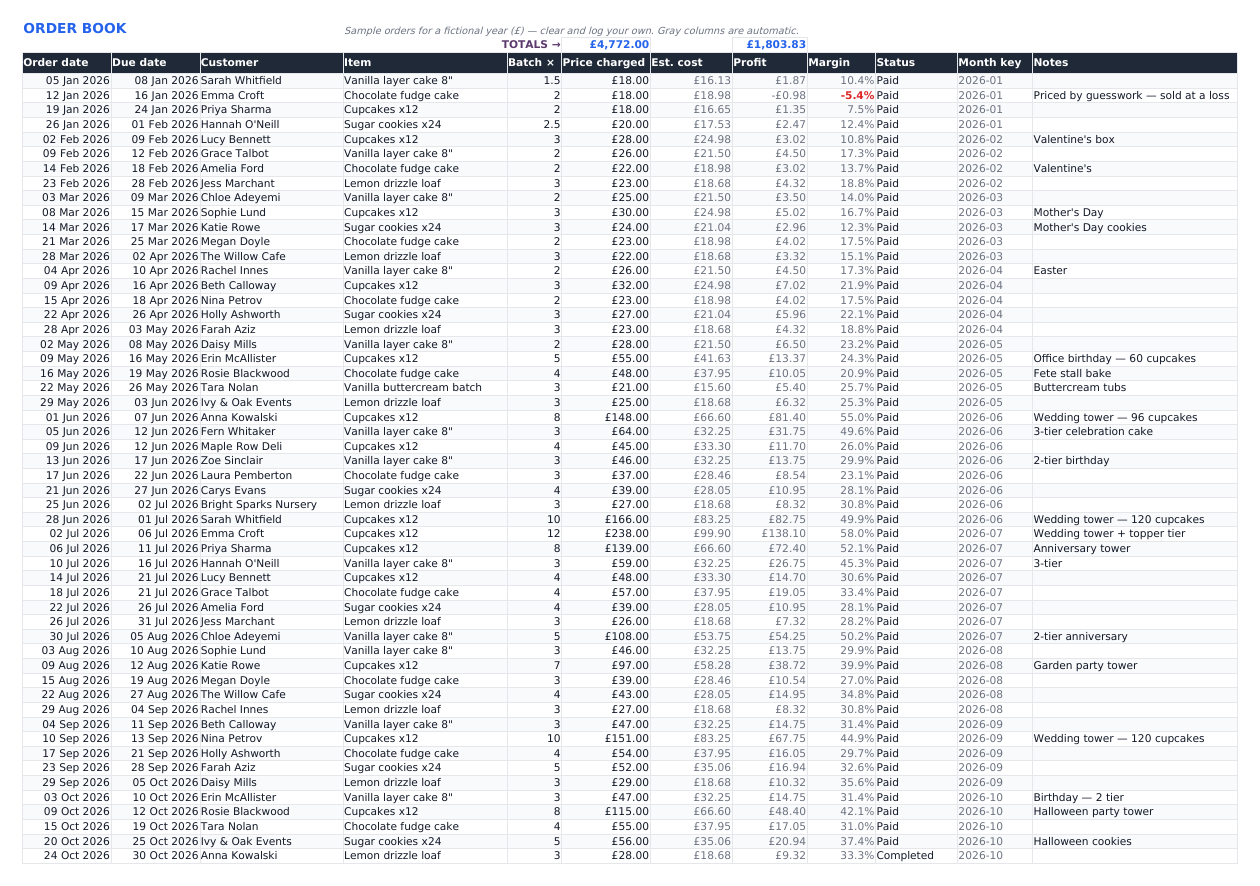
Status dropdowns and due-date alerts. Each row carries what you charged, what it cost, the profit and the margin, so a bad job shows up the week it happens instead of at year end.
5. Dashboard
Revenue, profit, average margin and a count of orders below 15% margin, over a monthly revenue-and-profit chart and a profit-by-product chart. Nothing here is typed; it reads the order book.
6. Instructions
Setup in plain English, the pricing formula on one page, and a start-fresh checklist for clearing the samples when you want your own numbers in there.
About the sample data
The workbook arrives holding a fictional baker’s year: 40 ingredients, 6 recipes, 85 orders across 12 months. Nothing looks empty on first open, and you can watch her margin climb over the year as she starts pricing properly. Every sample row is marked, and the Instructions tab names the ranges to clear.
What it looks like
The actual workbook, sample data and all. The screenshots show the sample currency; the file itself has a currency dropdown and no symbol written into any cell.
Specifications
| Format | One .xlsx file |
|---|---|
| Opens in | Microsoft Excel 2010 or later, Google Sheets (File → Import → Upload), LibreOffice Calc |
| Macros | None. Formulas only, all visible and editable |
| Tabs | 6: Ingredients, Recipes, Price Calculator, Orders, Dashboard, Instructions |
| Capacity | 20 recipe slots, 5 quote slots at a time, an order book you extend by copying the last row down |
| Sample data | 40 ingredients, 6 recipes, 85 orders across 12 months, all marked and clearable |
| Currency | A dropdown on the Instructions tab (EUR, GBP, USD, CAD, AUD, CHF, SEK, NOK, DKK, PLN, NZD) or type your own symbol. Every price label follows it; the amounts stay plain numbers, so no cell carries a currency |
| Units | g, kg, oz, lb, ml, l, fl oz, cup, tbsp, tsp and per-unit items, from one editable grams-per-unit table. The cup row ships at the liquid average of 240 g; edit it for dry ingredients, or enter those in grams |
| Delivery | Not on sale yet. When checkout opens: instant download after payment |
| Price | €7, paid once. No subscription, no account, no upsell inside the file |
Questions
Do I need Microsoft Excel?
No. It is a plain .xlsx with formulas only, so Excel, Google Sheets and LibreOffice Calc all open it. Import it into Google Sheets with File → Import → Upload. Some colours, fonts and chart styling will look slightly different outside Excel, which is true of any spreadsheet.
Will it work on my phone?
It opens in the Excel and Google Sheets mobile apps, and typing a price into a quote slot is fine. Setting up 40 ingredients on a phone is miserable. Do the setup on a computer and check quotes on your phone.
Can I use my own currency?
Yes, and you do not have to reformat anything. The Instructions tab has a currency dropdown with eleven codes, plus a cell for a symbol that is not on the list. Every price label in the workbook rewrites itself and the amounts stay as plain numbers, so a symbol can never go stale in a cell you filled in months ago. Every formula is a ratio of what you type, so the arithmetic is the same in any currency.
Does it handle VAT, sales tax or my tax return?
No, and that is deliberate: there is no tax rate of any country written into this file. It prices jobs and tracks profit per order. It files nothing and works out no tax. Whether you register for VAT, GST or a sales tax, and whether selling food from your kitchen needs a registration or a label, is set where you live. Keep using whatever your accountant asked you for.
I measure in cups. Does that work?
Partly, and there is a catch worth knowing before you buy. The conversion table holds one value per unit, and the cup row ships at 240 g, the liquid average. Right for milk and water, wrong for anything dry: a cup of flour is about 120 g, sugar 200 g, butter 227 g, cocoa 85 g. Enter dry purchases in grams, which is what we would do, or change the cup figure to match your own scoop. Those four numbers are printed next to the table in the file.
Are there macros or add-ons?
None. Nothing runs, nothing connects to the internet, nothing asks for permissions. That is also why it behaves the same in Google Sheets and LibreOffice.
How do I clear the sample data?
The Instructions tab names the ranges to delete on each tab. About two minutes. Keep a copy of the original if you want the samples back later.
Do I get updates?
The download is the file as it is today. No subscription and no update service. Once it is on your computer it is yours, and it will still open in ten years.
Something is broken. What then?
Email support@vendwright.com with what happened and which app you opened it in, and we will make it right.
How is this different from the free calculator on this site?
The free cake pricing calculator prices one cake and forgets it when you close the tab. The workbook keeps your ingredient prices, your recipes, five quotes at once, an order book and a dashboard, so the second cake takes thirty seconds instead of five minutes.
Price your next cake properly
One file, one payment, no account. If it stops you under-charging on a single wedding cake it has paid for itself several times over.
€7 price when checkout opens
Checkout opens shortlyEmail support@vendwright.com to be told when this template goes on sale.
Or use the free calculator first. It is genuinely useful on its own.