Instructions
A five-step quick start, one €20 sale priced out on every platform so you can check the maths yourself, a plain-English explanation of VAT and merchant of record, and a worked payout mismatch. Read once, keep.
Free spreadsheet template
You made €1,000 in sales. How much did you keep? This spreadsheet answers that in five seconds, because every platform's fee chain is already written into it: Gumroad direct and Discover, Etsy, Payhip, Ko-fi Shop and Lemon Squeezy.
Free the whole file, not a sample · nothing to buy
The link starts the download. No email address, no account, no sign-up, no follow-up. The zip holds the .xlsx and a short readme telling you how to open it in Excel, Google Sheets or LibreOffice.
Most sales trackers ask you to type in your own fee percentage, so most sellers guess, and the guess is usually one number applied to every platform. Fees do not work like that. Gumroad takes a percentage and a fixed amount. Etsy charges you three separate times on one order. A sale Gumroad found for you through Discover costs a flat 30%; the same sale through your own link costs 10% plus a fixed fee plus card processing.
Those chains are already in the file, in a table you can edit. Log the order, pick the platform from a dropdown, and the fee and the true net appear on the row. Right from the first sale, without looking up a single rate.
Everything downstream then works: monthly net by platform, net per product, refund rate, expenses, and profit that is actually profit rather than gross revenue with a nice chart on it.
If you want automatic imports from platform APIs, multi-currency bookkeeping at live exchange rates, or double-entry accounts, buy proper accounting software. This is a spreadsheet you type into.
Five tabs. The first one tells you how to use the other four.
A five-step quick start, one €20 sale priced out on every platform so you can check the maths yourself, a plain-English explanation of VAT and merchant of record, and a worked payout mismatch. Read once, keep.
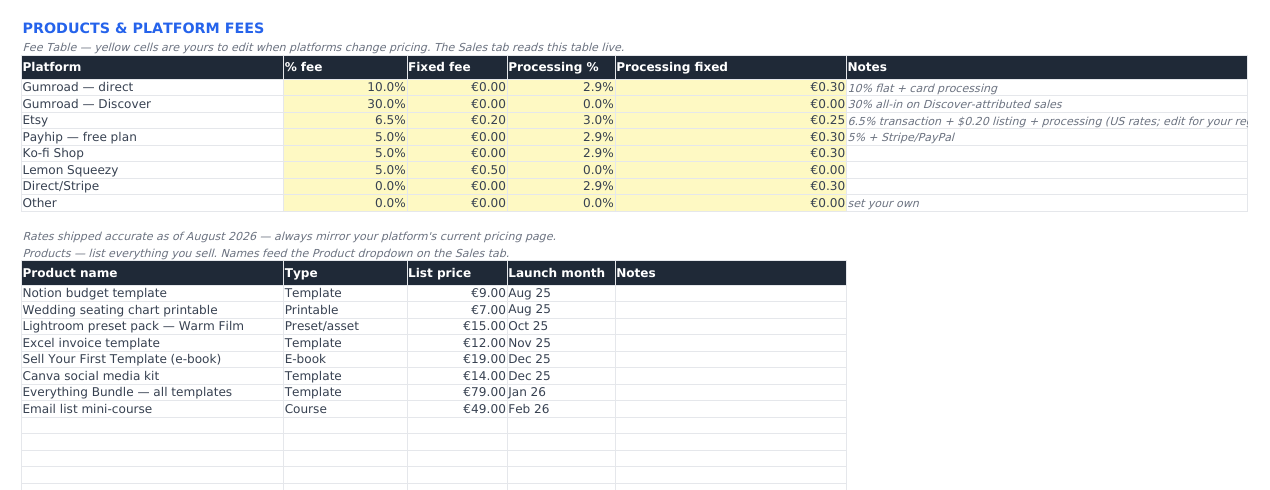
The fee table, and it is yours to edit: Gumroad direct and Discover, Etsy, Payhip, Ko-fi Shop, Lemon Squeezy, direct Stripe, and a spare row for whatever else you sell on. Percentage, fixed fee, processing percentage and processing fixed fee each get their own yellow cell. Your product list sits underneath and feeds the dropdown on the Sales tab.
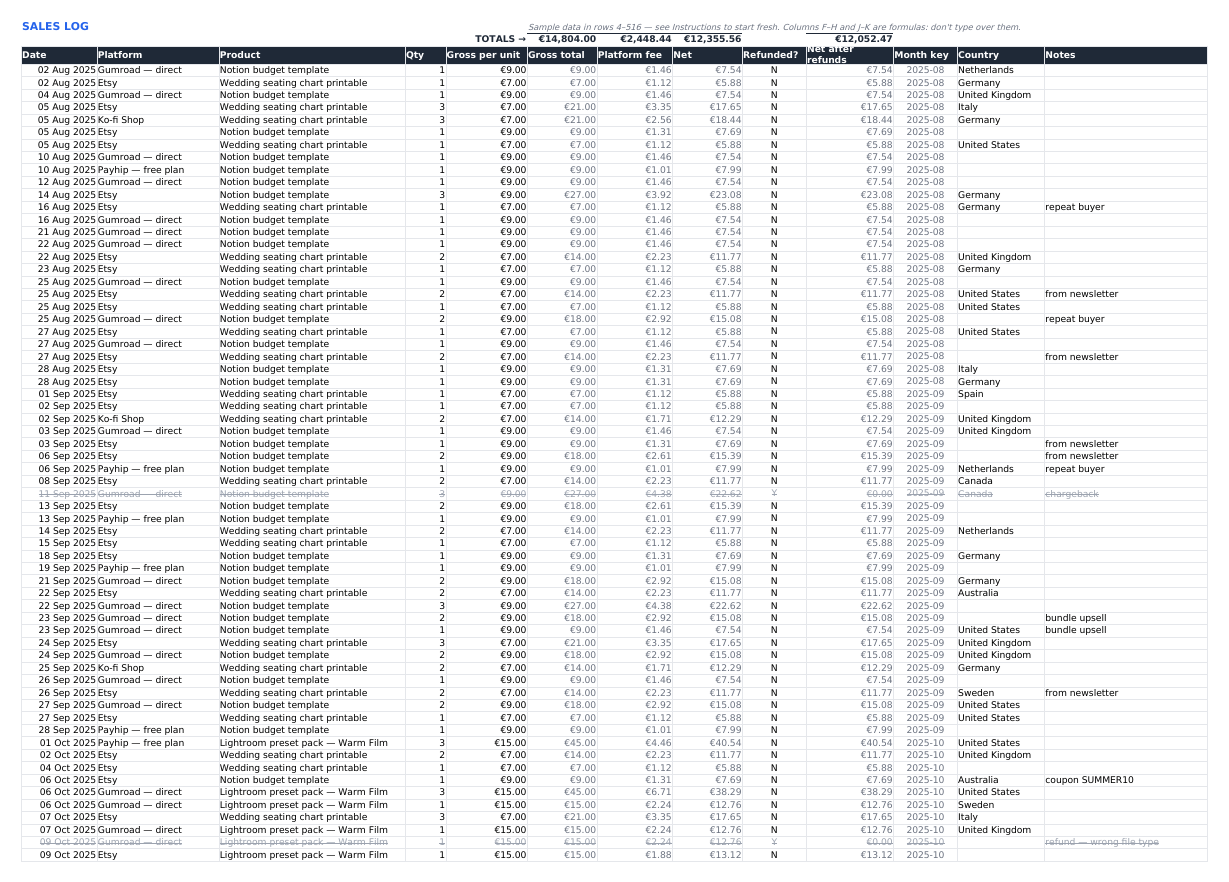
One row per order, 1,000 of them, formulas already filled to the last row. You type the date, platform, product, quantity and price. The fee, the net and the month are worked out from the fee table live. Mark a row refunded and it leaves net revenue but still counts towards your refund rate.
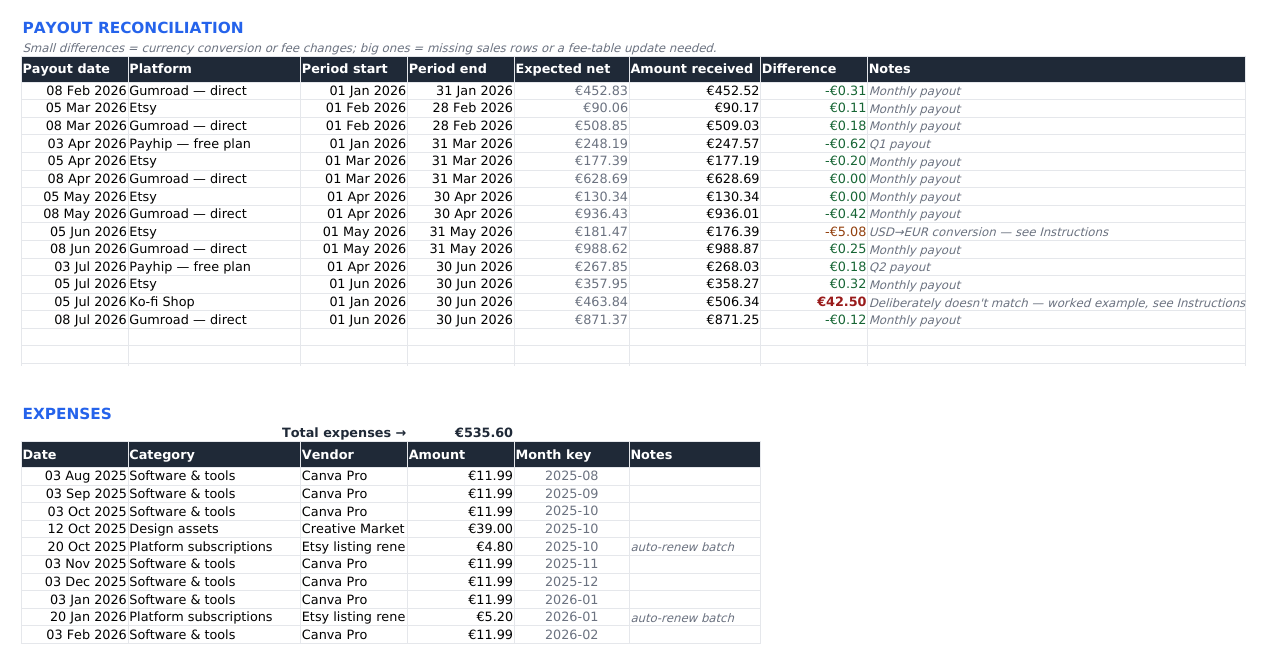
Enter each deposit with its period and the sheet checks it against what your sales log says you were owed: green inside a unit of your own currency, amber for a small gap, red for a real one. Underneath, a categorised expense list, so the profit figure has your costs taken out of it.
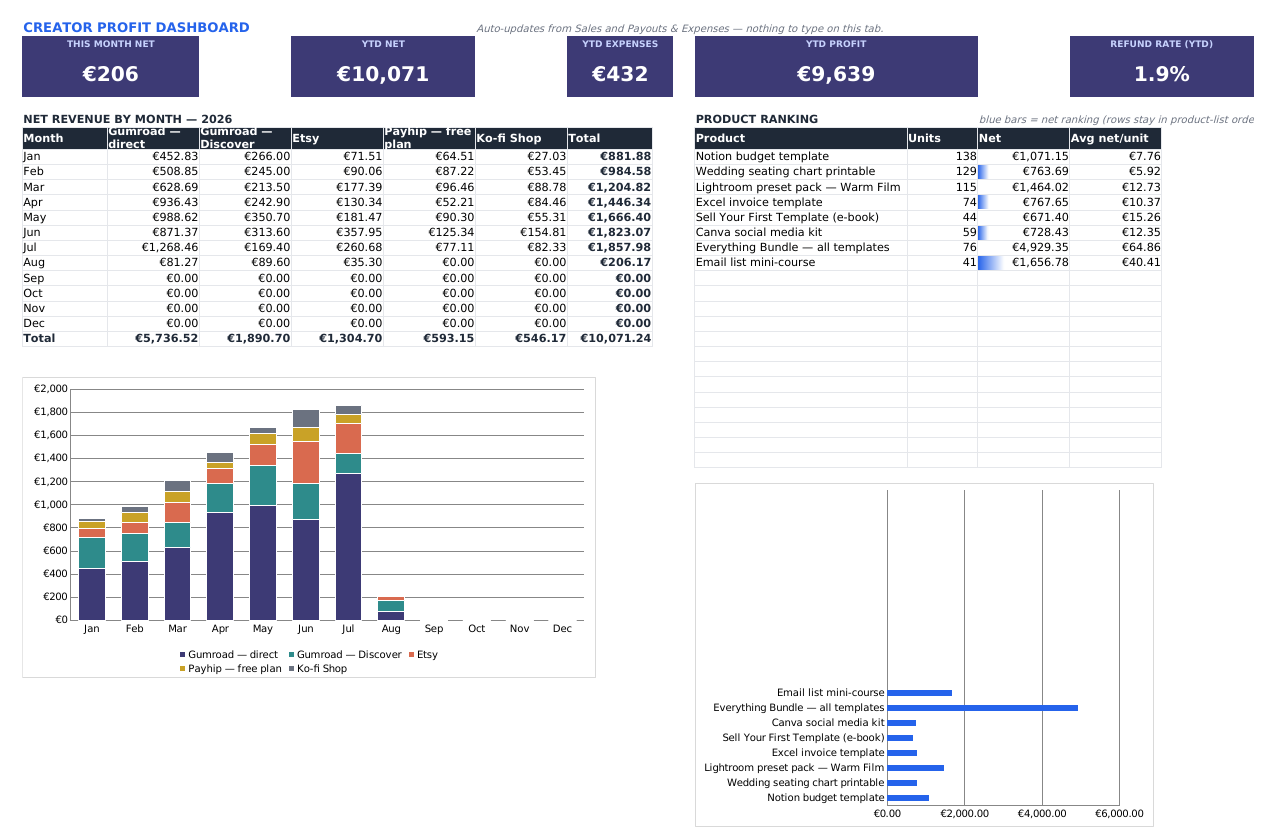
Nothing to type here. Net by month and platform as a table and a stacked chart, products ranked by net revenue with the average net per unit, and headline figures for this month, the year to date, expenses, profit and refund rate.
The file arrives holding a fictional template shop growing from about €240 to about €1,850 a month, chargeback and refund included, plus one payout that deliberately does not reconcile so you can watch the flag fire. Clearing it takes about two minutes; the Instructions tab says which rows.
The actual file, sample data and all. Open one in a new tab for full size.
| Format | One .xlsx file, roughly 130 KB |
|---|---|
| Works in | Microsoft Excel 2016 or newer (Windows, Mac, Microsoft 365), Google Sheets, LibreOffice Calc |
| Macros | None. No VBA, no scripts, no add-ons, no permission prompts |
| Tabs | Five: Instructions, Products & Fees, Sales, Payouts & Expenses, Dashboard |
| Capacity | 1,000 sale rows with formulas pre-filled, 30 payout rows, 100 expense rows |
| Platforms covered | Gumroad direct, Gumroad Discover, Etsy, Payhip, Ko-fi Shop, Lemon Squeezy, direct Stripe, plus a spare row you can name yourself |
| Currency | A dropdown on the Instructions tab (EUR, GBP, USD, CAD, AUD, CHF, SEK, NOK, DKK, PLN, NZD) or type your own symbol. Every money heading follows it and no cell has a currency baked into its number format. One currency at a time: it does not convert between them |
| Fee rates | Shipped accurate as of August 2026 and dated on the sheet. When a platform changes its pricing you edit one yellow cell |
| Price | Free. It is not sold anywhere, at any price |
| Delivery | A direct download from this site, about 93 KB. No payment, no account, no email address, no subscription, no email course |
| Licence | For your own business. Do not resell or redistribute the file |
| Updates | None promised. The file is yours as it is on the day you download it, and it keeps working whether or not we touch it again |
There is no catch, and there is no cut-down version you get charged for later. This is the whole workbook. We built it to sell, then went and looked at what the people already selling one were earning, and the answer was nothing worth building a business on. So it does a different job now: it is the thing that brings people to this site, some of whom will later want a template we do sell. That is the entire return we expect from it, and we would rather say so than pretend it is a gift.
What we are not doing is taking your email address for it. There is no list here to join, as the privacy page says, and a download that asks for nothing is cheaper for us to run than one that does.
No. You type your sales in, or paste them from a platform export. No API, no sync, no login. That is the trade for a file that costs nothing, has no subscription, and will still open in ten years.
You open the Products & Fees tab and edit the yellow cells for that platform. Every row on the Sales tab recalculates, including rows you entered before the change. If you want history to stay accurate at the old rate, add a new platform row instead of editing the old one. The rates in the file were correct in August 2026 and are dated on the sheet, but no spreadsheet updates itself, and you should check them against the platform's own pricing page. Our free platform fee calculator keeps a dated fee table you can copy from.
Not as a calculation. It records what you were paid and what the platform took. The Instructions tab explains who the merchant of record is on each platform, and therefore who is remitting the VAT on your sales, which is the question most sellers actually need answered. It does not produce a VAT return and it is not tax advice.
Yes. Upload the file to Drive and open it with Sheets. The formulas, dropdowns and conditional formatting all carry over. The two charts are rebuilt by Google on import and sometimes lose their colours; the Instructions tab has a short section on what to expect in Sheets and LibreOffice.
Partly. The fee maths is a percentage plus a fixed fee, which describes most marketplaces, so an Etsy print-on-demand order calculates correctly. There is no cost-of-goods, shipping or stock column though, so the "net" here is net of fees, not net of what the item cost you to make. Selling physical goods, you want a different tool.
There is, and yes. Twelve months of a fictional shop, clearly marked, in rows 4 to 516 of the Sales tab plus the payout and expense lists. Select those ranges and delete. Two minutes, and no formula breaks.
1,000 rows with the formulas already in place, and you can drag them further down. At a few thousand rows a month a spreadsheet is the wrong answer and real bookkeeping software is the right one.
Not at once. Picking the currency is a dropdown on the Instructions tab, eleven codes or your own symbol, and every heading in the workbook follows it. What it will not do is hold two at the same time. Paid in dollars and euros? Keep a copy per currency, or convert each payout as you enter it. Live exchange rates are more than a plain spreadsheet should promise.
No password, no protected ranges, no hidden sheets. Every formula is visible and editable. If you want to add a column, add one.
Delete it. You paid nothing, so there is nothing to refund and nothing to cancel. The screenshots above are the real file, so you can mostly tell before you download. If it will not open, or does not do what this page says it does, email support@vendwright.com and it gets fixed. Free does not mean unsupported.
One file, no subscription, nothing asked for in return. Every fee chain built in, a year of sample data to learn from, and 1,000 rows waiting for yours.