Spreadsheet template

Home Renovation Budget Tracker

Room-by-room estimate against actual, contractor bids compared on true all-in cost, a change-order log that revises the affected budget line for you, and a contingency meter that turns amber before your bank account does.

€15one-time · not on sale yet

One .xlsx file 6 tabs No macros Excel · Google Sheets · LibreOffice
Checkout opens shortlyEmail support@vendwright.com to be told when this template goes on sale. Try the free calculator

Checkout is not open yet, so this file cannot be bought today. When it opens, checkout and delivery are handled by our payment processor and the download link appears as soon as payment clears. No account, no subscription.

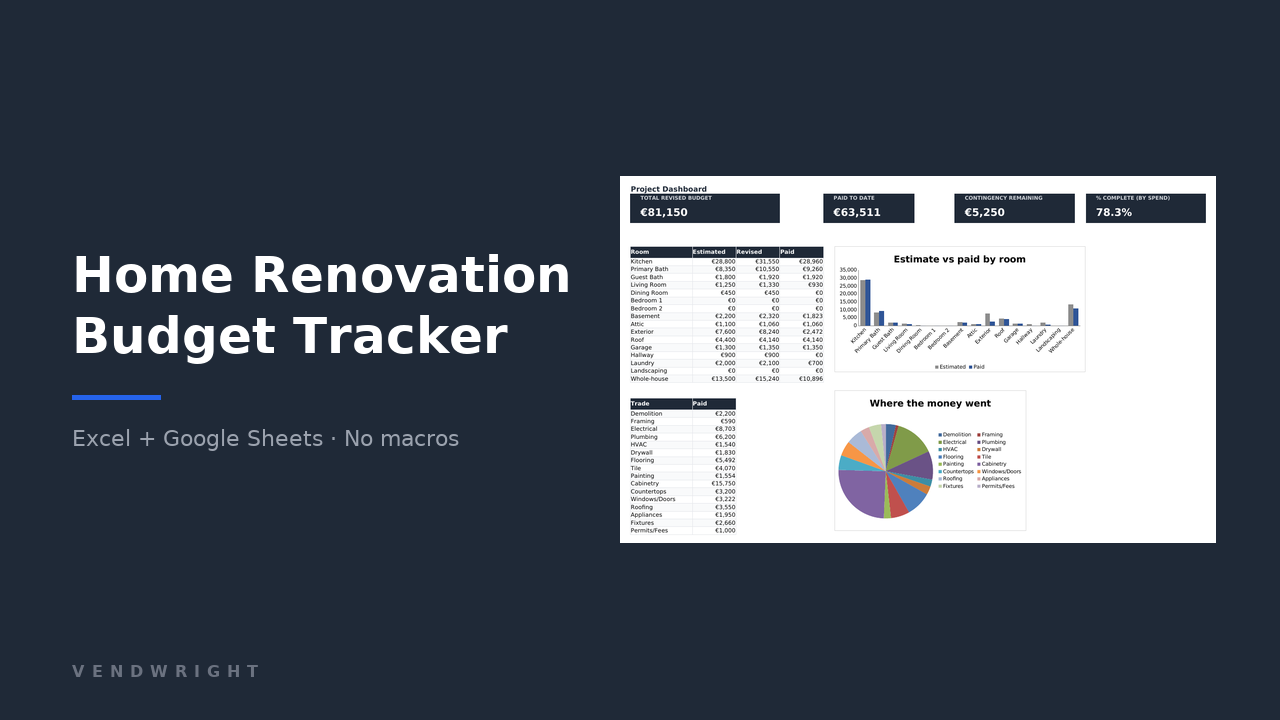
Product cover: the Home Renovation Budget Tracker dashboard, showing four KPI tiles, a room summary table and two charts.

Renovations do not go over in one line. They bleed.

This workbook is built around the three places the money actually goes missing, not around a pretty total.

The bid that was never comparable

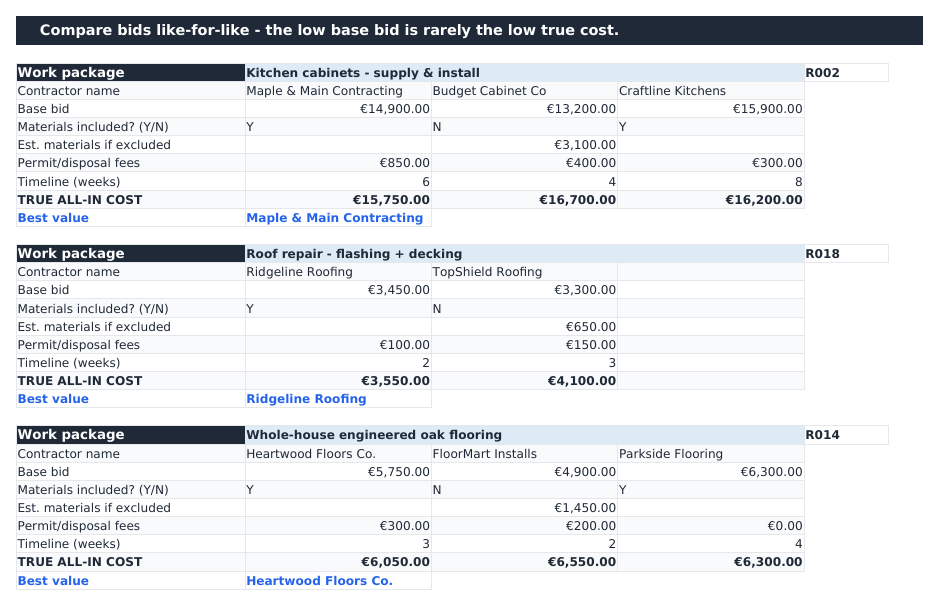
One contractor includes materials, one does not, one absorbs the permit fee. The cheapest base bid is often the most expensive job. The Quote Comparison tab normalises all three to a true all-in cost before you sign anything.
The change nobody logged

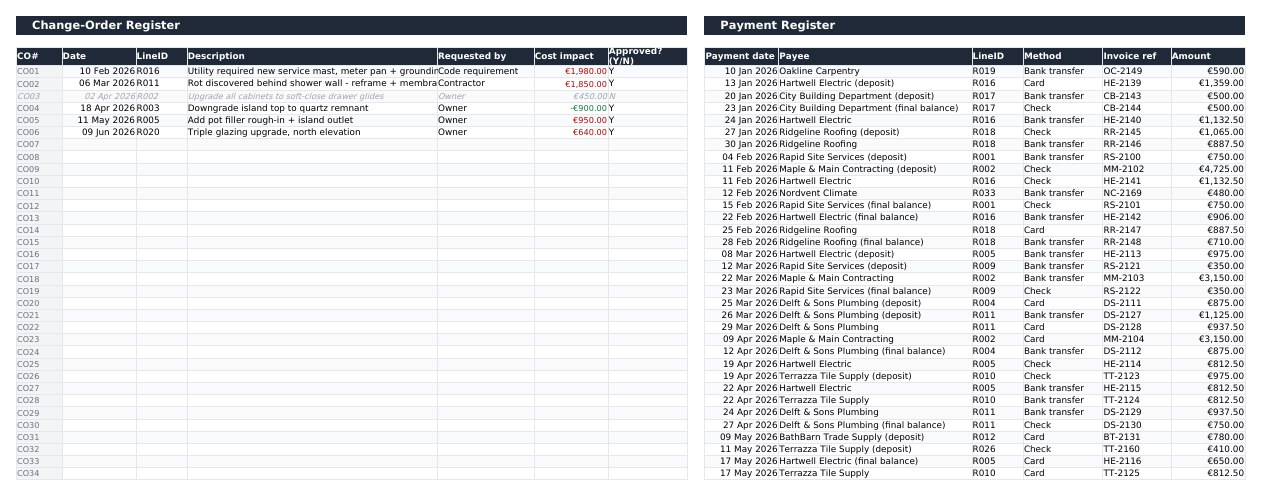
Small verbal changes accumulate into a number you only meet at the final invoice. Log each one once, mark it approved, and the affected budget line's revised budget updates itself.

The contingency you spent by March

Most people set a contingency and never look at it again. The dashboard tile turns amber once 75% of the buffer is committed and red when scope growth has eaten all of it.

What it does

  • Tracks up to 200 budget lines, each tagged with a room and a trade, with estimated cost, contracted price, revised budget, paid to date and remaining side by side.
  • Colours the variance column automatically: green under estimate, amber within 5% over, red beyond that.
  • Compares up to three contractor bids per work package on true all-in cost — base bid, plus excluded materials, plus permit and disposal fees — and names the best value in writing.
  • Rolls approved change orders into the revised budget of the line they affect, so the budget you are looking at is the current one.
  • Logs 300 payments with payee, method and invoice reference, and highlights any invoice reference that appears twice.
  • Rolls paid-to-date up per budget line, per room and per trade without you writing a single formula.
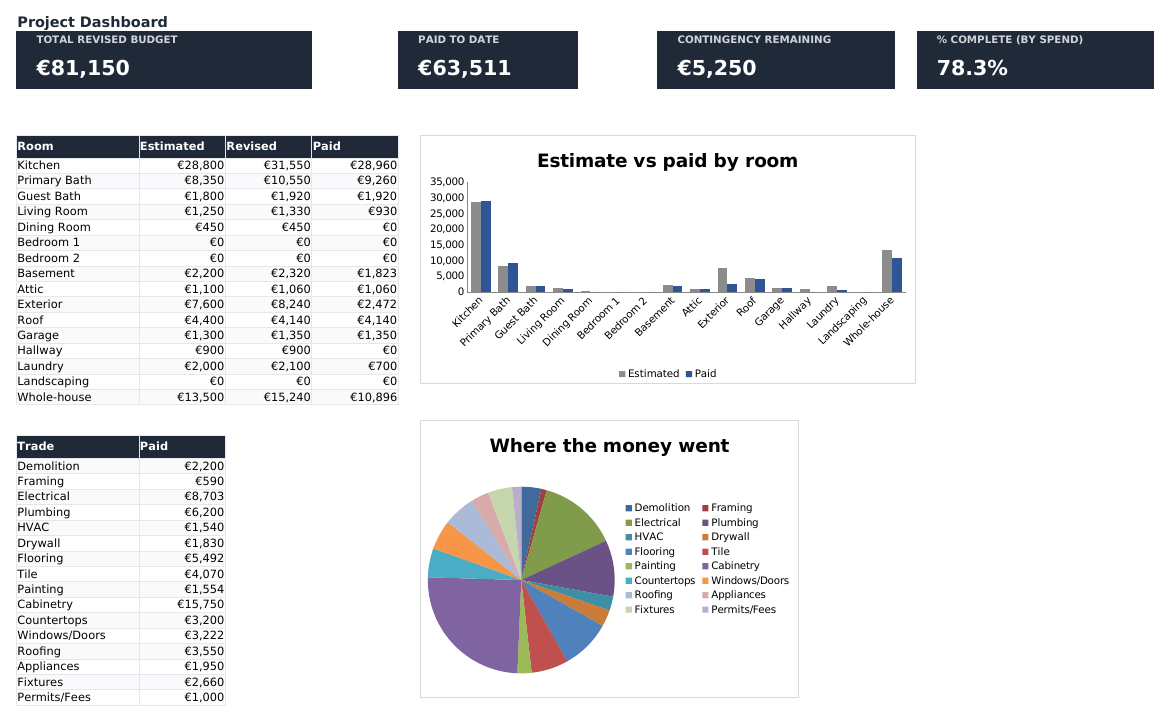
  • Shows revised budget, paid to date, contingency remaining and percent complete by spend on one dashboard, plus estimate-versus-paid by room and where the money went by trade.
  • Ships with a full 12-month sample project you can read, understand, and then clear in about a minute.

Who it is for

It is a homeowner's tool. It is worth saying plainly who it is not for.

A good fit if

  • You are renovating your own home, or a rental, and you are the one paying the invoices.
  • You have more than one contractor quoting, or one contractor and several trades.
  • The project runs over months rather than a weekend, so the difference between estimated, contracted and paid actually matters.
  • You are comfortable typing numbers into a spreadsheet. That is the whole skill requirement.

Not a good fit if

  • You want it to tell you what a kitchen costs. It holds no price data at all — you supply the quotes and it does the arithmetic. Use the free contingency calculator for a planning number.
  • You are a contractor billing clients. It is written from the paying side, with no invoicing, retention or margin tracking.
  • You want bank feeds, receipt scanning or a phone app. It is a spreadsheet you type into.
  • You want to run the whole project from a phone. It opens in the Google Sheets app, but it is laid out for a laptop screen.

What is inside, tab by tab

Six linked tabs. Nothing is hidden, locked or password protected.

1. Instructions

A one-page read: the order to fill things in, what each tab is for, how to import into Google Sheets, and how to clear the sample project and start on your own.

2. Setup

Project name, start and target end dates, total budget and contingency percentage — which is validated to 5–30% so a stray keystroke cannot silently break the meter. Also holds the room, trade and status lists that feed every dropdown in the workbook. Edit the lists freely; they are named ranges.

3. Budget Lines

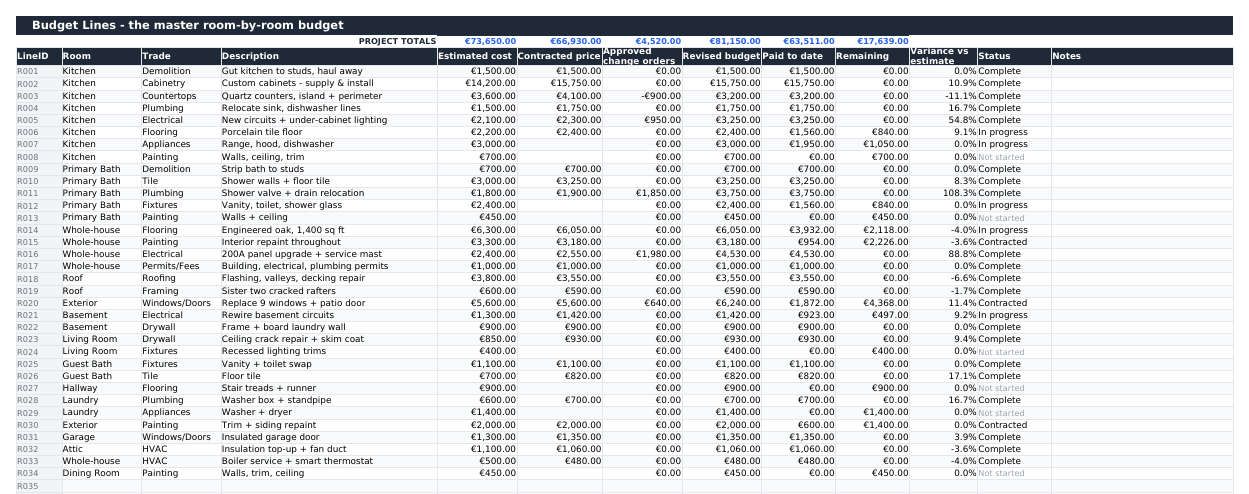
The master sheet: 200 rows, each with a line ID, room, trade, description, estimated cost, contracted price, approved change orders, revised budget, paid to date, remaining, variance against estimate, status and notes. Everything from column G rightwards is a formula. Empty rows stay visually empty instead of showing a wall of zeros.

4. Quote Comparison

Twenty comparison blocks, three bids each. Enter the base bid, whether materials are included, the estimated materials cost if they are not, permit and disposal fees, and the timeline. The block returns a true all-in cost per bidder, highlights the lowest and writes out the best-value contractor's name. Link a block to a budget line by its ID.

5. Change Orders + Payment Register

Two registers side by side on one tab. 100 change orders with date, affected line, description, who requested it, cost impact and an approved flag — approved ones flow into that line's revised budget, rejected ones grey out but stay on the record. 300 payments with date, payee, line, method, invoice reference and amount; a repeated invoice reference is highlighted in amber.

6. Dashboard

Four KPI tiles — total revised budget, paid to date, contingency remaining, percent complete by spend — over a by-room table, a by-trade table, an estimate-versus-paid bar chart and a where-the-money-went pie chart. The contingency tile changes colour on its own as the buffer is consumed.

Screenshots

Taken from the sample project the file ships with. Every number you see is sample data you overwrite.

Dashboard tab: four dark KPI tiles reading total revised budget, paid to date, contingency remaining and percent complete, above a room summary table, a trade summary table, a clustered bar chart of estimate versus paid by room and a pie chart of spend by trade.
Budget Lines tab: a wide table of renovation line items grouped by room and trade, with columns for estimated cost, contracted price, approved change orders, revised budget, paid to date, remaining, variance versus estimate and status.
Quote Comparison tab: three comparison blocks, each listing contractor names, base bid, whether materials are included, estimated materials, permit and disposal fees, timeline in weeks, a bold true all-in cost row and a best-value line naming one contractor.
Change Orders and Payment Register tabs side by side: a change-order table with cost impacts in red for increases and green for credits, one rejected row greyed out, next to a long payment register listing payee, line ID, method, invoice reference and amount.

Specifications

Everything you are buying, in one table.
Format One .xlsx workbook, 6 tabs. No macros, no add-ins, nothing to install.
Works in Excel 2010 or later (Windows and Mac), Google Sheets via File › Import › Replace spreadsheet, and LibreOffice Calc. Only cross-compatible formulas are used — SUMIF, SUMIFS, INDEX/MATCH, COUNTIF.
Capacity 200 budget lines, 20 quote comparison blocks of 3 bids each, 100 change orders, 300 payments.
Charts Two: estimate versus paid by room, and paid by trade. Both native spreadsheet charts that survive the Google Sheets import.
Currency Currency-agnostic. Formatted in euro out of the box; switching to $, £ or anything else is a number-format change, covered in the Instructions tab.
Sample data A complete 12-month project, “Maple Street House”, with 34 budget lines, 6 change orders and a full payment history. Clearing it is a documented two-minute job.
Delivery Not on sale yet. When checkout opens: instant download after payment, no account to create.
Price and updates €15 once, with no subscription. There is no update service: what you download is the file as it stands on the day you buy it. If we ever publish a corrected version of a file you already bought, email us and we will send it.
Licence Buy once, use it on your own projects for as long as you like. Not for resale or redistribution. See the terms.
Support Email support@vendwright.com — you will get a fix or a straight answer.

Questions

Does it tell me what my renovation should cost?

No, and nothing that claims to should be trusted for your street. The workbook contains no price data. You enter your own quotes and it does the tracking, comparison and arithmetic. If you need a planning number before you have quotes, the free renovation contingency calculator will size a realistic buffer for you.

Will it really work in Google Sheets?

Yes. Open Sheets, choose File › Import › Upload, pick the file and select “Replace spreadsheet”. Every formula is from the cross-compatible set, so the dropdowns, conditional colours and both charts come across. There are no macros to be stripped out, because there are none.

Can I change the rooms and trades?

Yes. The Setup tab holds the room list, trade list and status list, and they are named ranges that feed every dropdown. Overwrite the entries with your own. Do not delete the rows themselves — blank them instead — or the named ranges shrink.

What happens if I need more than 200 budget lines?

Most home projects use 30 to 60. If you genuinely need more, copy the last row down; the formulas are consistent across the block and will extend cleanly. You will also need to widen the SUM ranges on the Dashboard, which is a find-and-replace of the row number. If that sounds like a chore, it is — 200 lines is a deliberate ceiling, not a technical limit.

How does the contingency meter actually work?

You set a total budget and a contingency percentage on Setup, and the contingency amount is calculated from those two. The Dashboard tile then subtracts the amount your revised budget has grown beyond your original estimates — in other words, the approved change orders. The tile turns amber when less than 25% of the buffer is left and red when the growth exceeds it.

Is the sample project in the way?

It is there so you can see how a filled-in project behaves before you trust it with yours. The Instructions tab tells you exactly which ranges to clear. It takes a couple of minutes and nothing breaks, because the formula columns are untouched by it.

Does it handle VAT or sales tax?

Not as a separate calculated column. Enter your quotes the way you received them — if they are tax-inclusive, the whole workbook is tax-inclusive and stays consistent. Mixing inclusive and exclusive quotes in the same budget is the one thing that will mislead you, and no template can fix that for you.

Can I use it on my phone?

You can open it in the Google Sheets or Excel mobile apps and it will work, and logging a payment on site is fine. Reading a 13-column budget table on a phone is not. It is designed for a laptop screen.

Refunds?

It is a digital file that downloads instantly, so it cannot be returned in the usual sense. If it does not do what this page says it does, email support@vendwright.com and you will get your money back without an argument. Full detail on the refunds page.

Are there reviews I can read?

Not yet — this is a new product and we are not going to invent any. The screenshots above are the real file, the specifications table is exact, and the free calculator will show you how we think about this problem before you spend anything.

Home Renovation Budget Tracker

One .xlsx file, six tabs, no macros, no subscription. Yours for €15, with a refund if it is not what this page described.

Checkout opens shortlyEmail support@vendwright.com to be told when this template goes on sale. Size your contingency first