Personal Affairs Organiser
Somebody is going to have to work out where everything is. Which bank, which pension, where the will is actually kept, who has the spare key, what those direct debits are for. You know all of it and nobody else knows any of it. Written down it takes an afternoon; reconstructed from a drawer of paper afterwards it takes months.
It works in any country and in any currency. It carries no deadline, no threshold and no rule of its own, so there is nothing in it that can be wrong where you live, and the currency is a dropdown of eleven codes on the Instructions tab, or your own symbol typed in.
- Where every original document is kept, and whether you have actually seen it lately
- Accounts, pensions, property and what is owed, with last four characters only
- Online accounts: close, transfer, delete or memorialise, and who does it
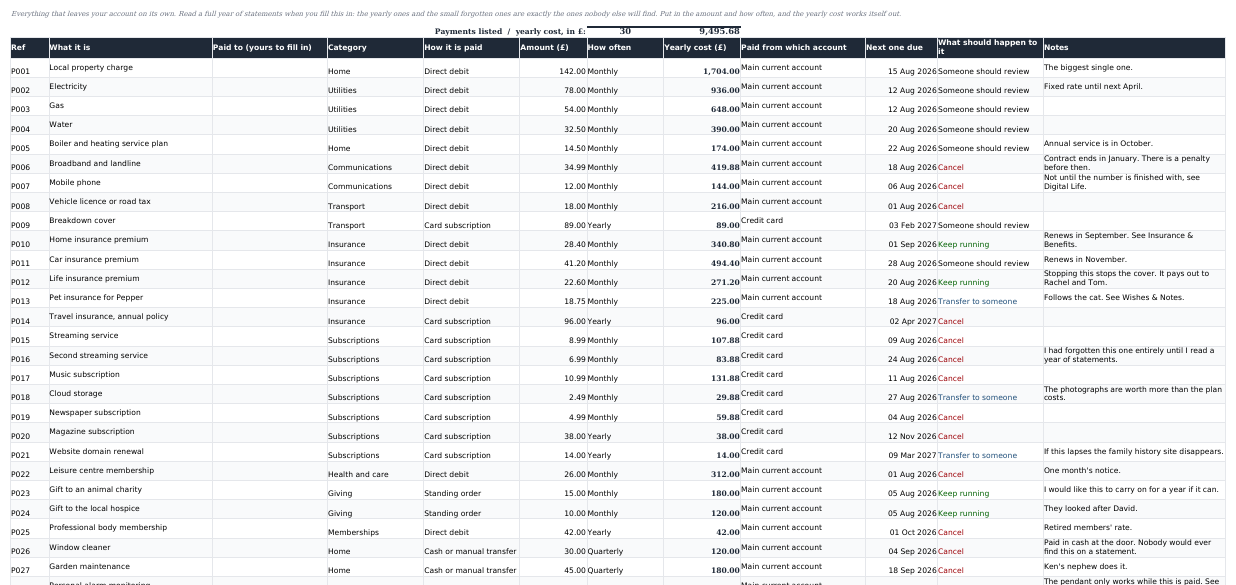
- Every regular payment, with the yearly cost worked out for you
- Twenty wishes prompts, and a one-page summary that reads all of it
It is the other half of the Estate Executor Organizer. That one is for the person sorting it out afterwards. This one is for you, now.
€12 one-off
One .xlsx file. Not on sale yet. Instant download after payment once checkout opens. No subscription, no account to keep.
Checkout opens shortlyEmail support@vendwright.com to be told when this template goes on sale.This is not a will
Writing something on these tabs gives nothing to anybody. Only a valid will, made the way your country requires, can leave anything to anyone, and if this file and your will ever disagree, the will is what happens. The workbook appoints nobody, grants nobody any authority, and contains no advice, no deadline and no rule of its own. It records what you already know about your own life.
What it does
Most of what your family will need is not secret. It is just scattered. The pension nobody knew about, the subscription still charging a closed card, the safe deposit box, the cousin who should be told. All of it lives in one head, and the one person who could explain it is the one person who will not be there.
This is a form you fill in about yourself. Fourteen tabs, each asking short questions with a note beside them telling you what is worth writing and what is not. Nothing in it is binding, nothing needs a witness, and you can change any of it whenever you like. The point is that a stranger could open it and know where to start inside five minutes.
It does no arithmetic you did not ask for. Two things are worked out: the yearly cost of your regular payments, and the totals of what you own against what you owe. Everything else is your own words in a box, which is precisely what makes it usable in any country.
Who it is for
Anyone getting their affairs in order, for the ordinary reason that it is easier now than it will ever be again. Retirement, a diagnosis, a house move, or simply a birthday with a zero in it.
Adult children helping a parent. The tab structure gives you something to ask about that is not "so what happens when you die". You sit down with a laptop and fill in where the deeds are.
Executors who have just learned the hard way. A common way people find this file is having spent six months settling somebody else's estate and deciding nobody is doing that to their family.
Passwords never go in it
Not once, not temporarily. The workbook asks where the password lives, not what it is: which password manager, where the recovery kit is kept, who has emergency access. Account numbers go in as the last four characters only. Anyone who finds this file should learn where to look, not how to get in.
Your data stays yours
It is a file on your computer. No account, no sync, nothing phoning home. The Instructions tab walks you through putting a password on the file in Excel and in LibreOffice, and tells you to make sure one person you trust knows it exists and how to open it.
What is inside, tab by tab
Fourteen tabs. Every figure on the summary comes from what you typed on the other thirteen.
1. Instructions
Opens with three lines: this is not a will, it appoints nobody, and it is not advice. Then the privacy rules, where to start, the currency picker, and the exact cells to clear when you want the sample person gone.
2. About Me
Twenty-two fields and about ten minutes: names you have used, identifiers by their last four characters only, address history, dependants, doctor, medication, emergency contacts. Each field carries a note about what to write, and what not to.
3. Key People
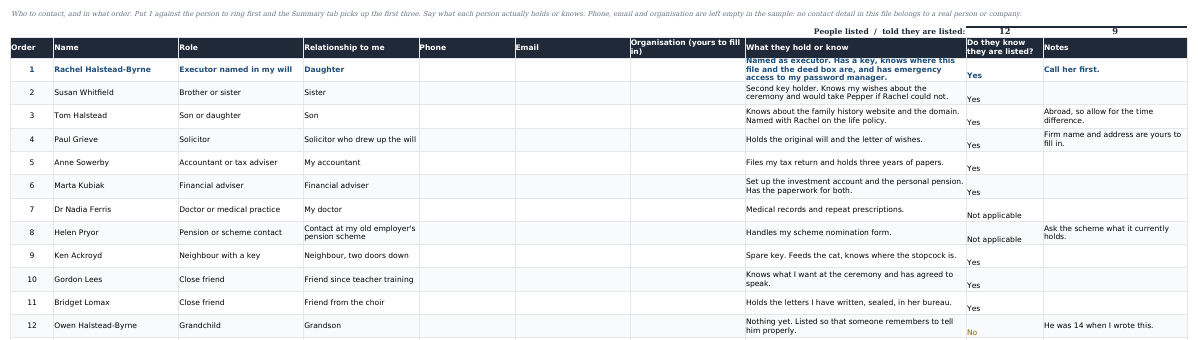
60 rows, numbered in the order you would want them called, and the summary page picks up the first three. A column asks what each person actually holds or knows, because "family friend" tells a stranger nothing, and another records whether you have told them they are on the list.
4. Health & Care
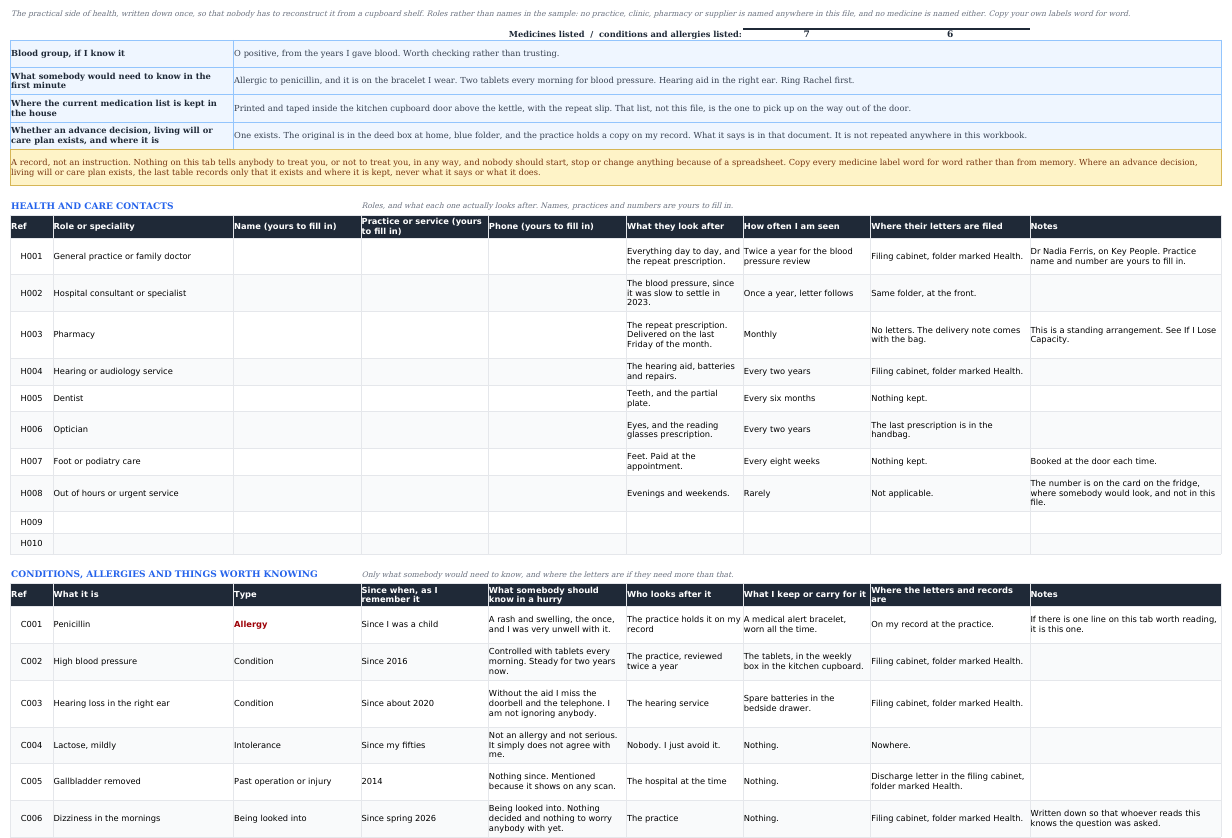
Four answers somebody would need in the first minute: blood group, the thing to know straight away, where the current medication list is kept in the house, and whether an advance decision or care plan exists and where. Then six tables: who looks after what, conditions and allergies, medication copied word for word off the label, devices and aids, care given and received, and health documents. It records that a document exists and where it is. It never repeats what it says, and it tells nobody to treat you or not to treat you.
5. Documents & Where They Are
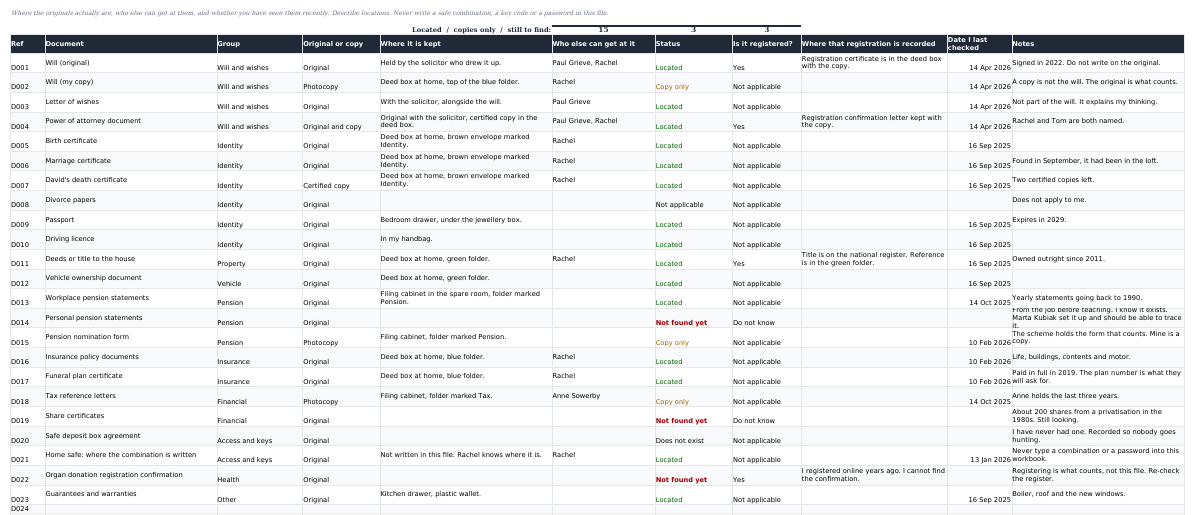
60 rows, with twenty-three documents already listed as a walk-round checklist: the will, the deeds, the certificates, the pension nomination, the safe. Where each one is, who else can get at it, whether it is registered anywhere, and the date you last laid eyes on it.
6. Accounts & Money
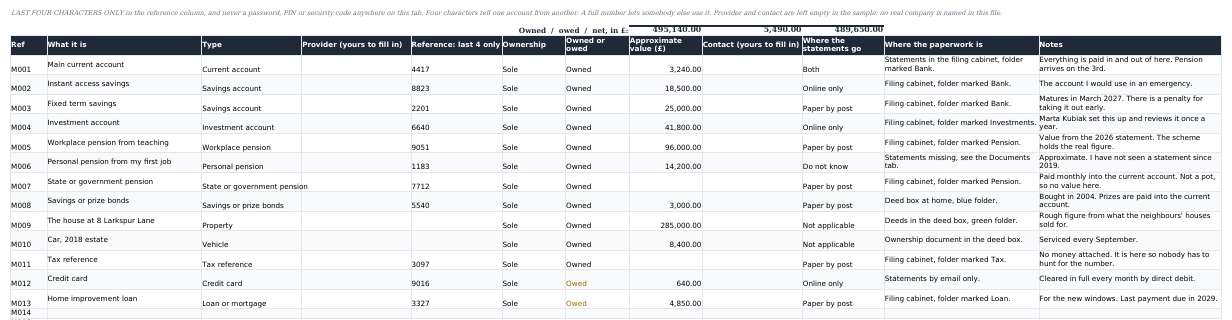
60 rows for current accounts, savings, investments, pensions, property, vehicles, cards and loans. Mark each row owned or owed and the two totals separate themselves. References go in as the last four characters, never the whole number.
7. Property & Possessions
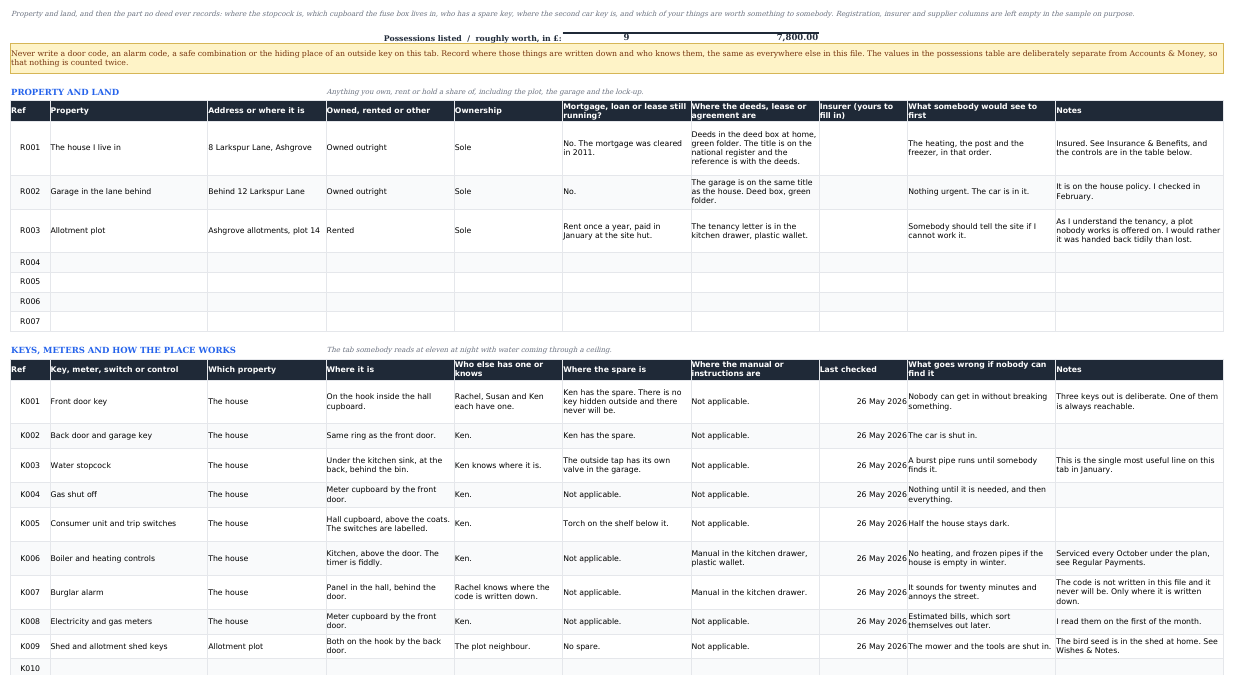
Property and land first: what you own, rent or hold a share of, where the deeds or the tenancy live, and what somebody would see to first. Then the part no deed records. Where the stopcock is, which cupboard the fuse box is in, who else has a key and where the spare is, what the boiler timer does, what goes wrong if nobody can find it. Vehicles and belongings follow. No door code, alarm code or safe combination ever goes on it.
8. Digital Life
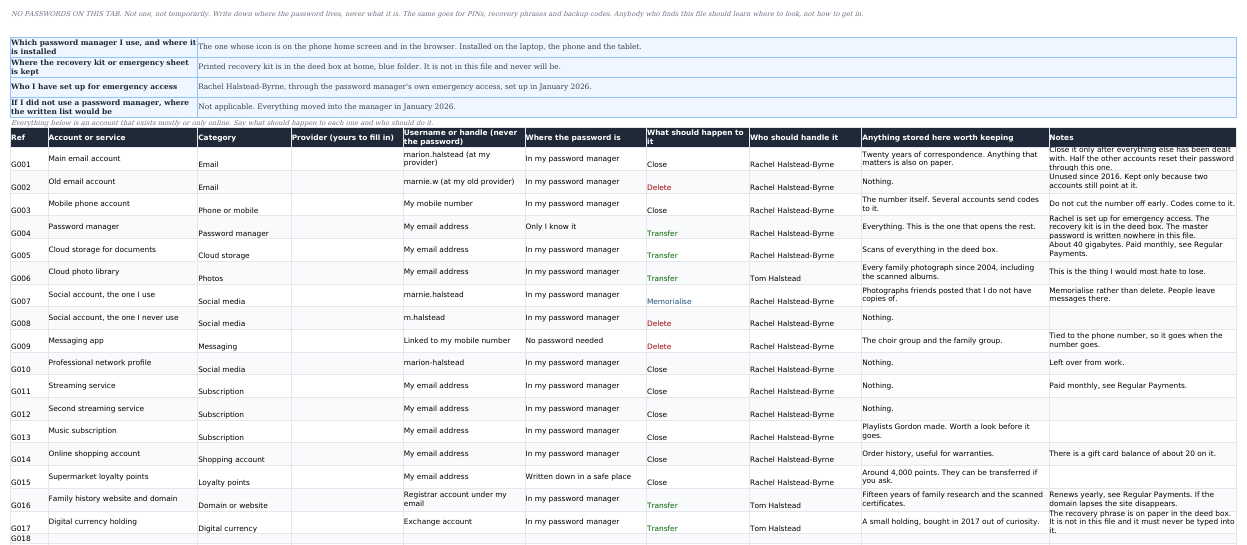
The tab most of these files are missing. 60 rows for accounts that exist only online, each marked close, transfer, delete or memorialise, with who should handle it and what is stored there worth keeping. Four questions at the top cover the password manager and emergency access. No password ever goes on this tab.
9. Regular Payments
60 rows for everything that leaves your account on its own. Put in the amount and how often, and the yearly cost works itself out. Each row is marked cancel, transfer, keep running or someone should review, which is the difference between a helpful list and a dangerous one.
10. Insurance & Benefits
50 rows: what each policy pays, who is named on it, the premium, and when it renews. The tab says plainly that writing a name in the "who is named" column does not name that person on the policy. Only the provider's own nomination form does that.
11. If I Lose Capacity
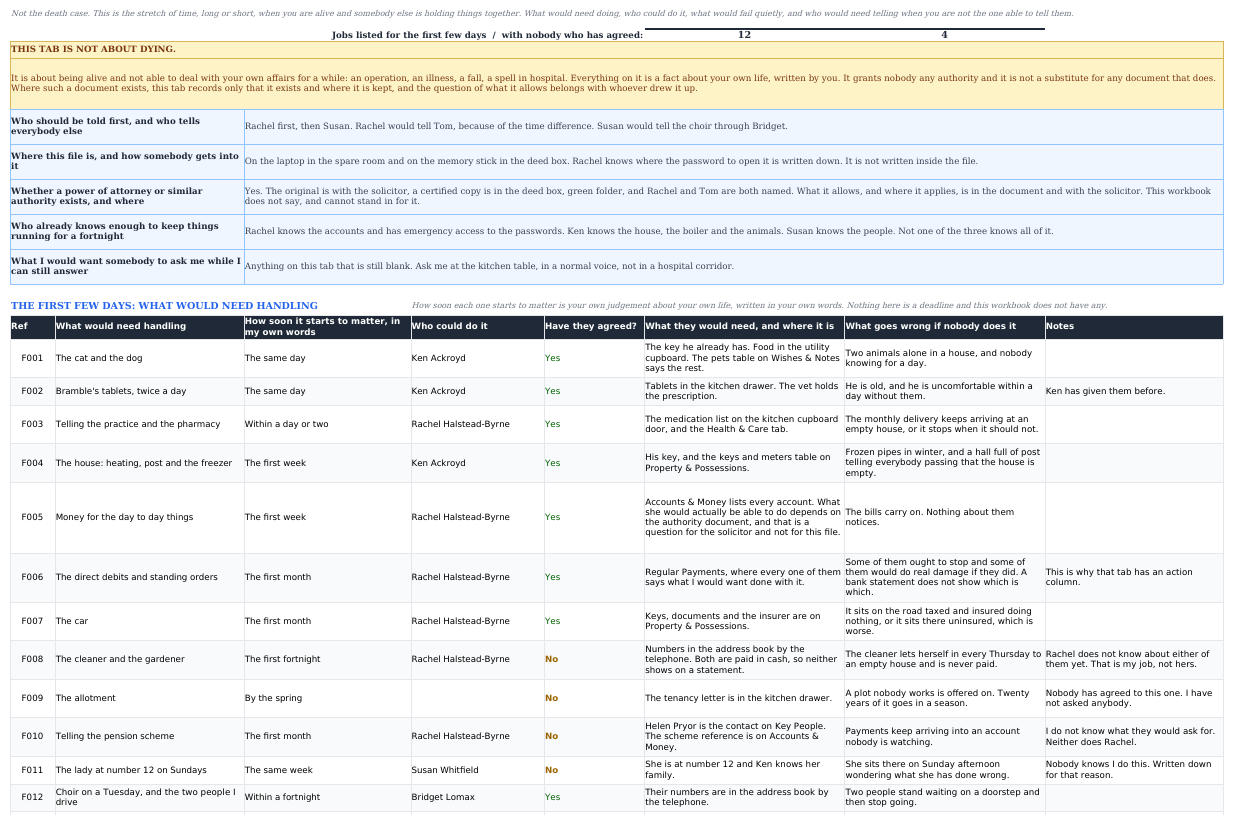
Not the death case. This is the stretch of time, long or short, when you are alive and somebody else is holding things together after an operation, an illness or a fall. Who would need telling first, what would need handling in the first few days and whether anybody has actually agreed to it, which standing commitments would fail quietly with no letter to say so, and how the week really runs. It grants nobody any authority and says so before the first row.
12. Wishes & Notes
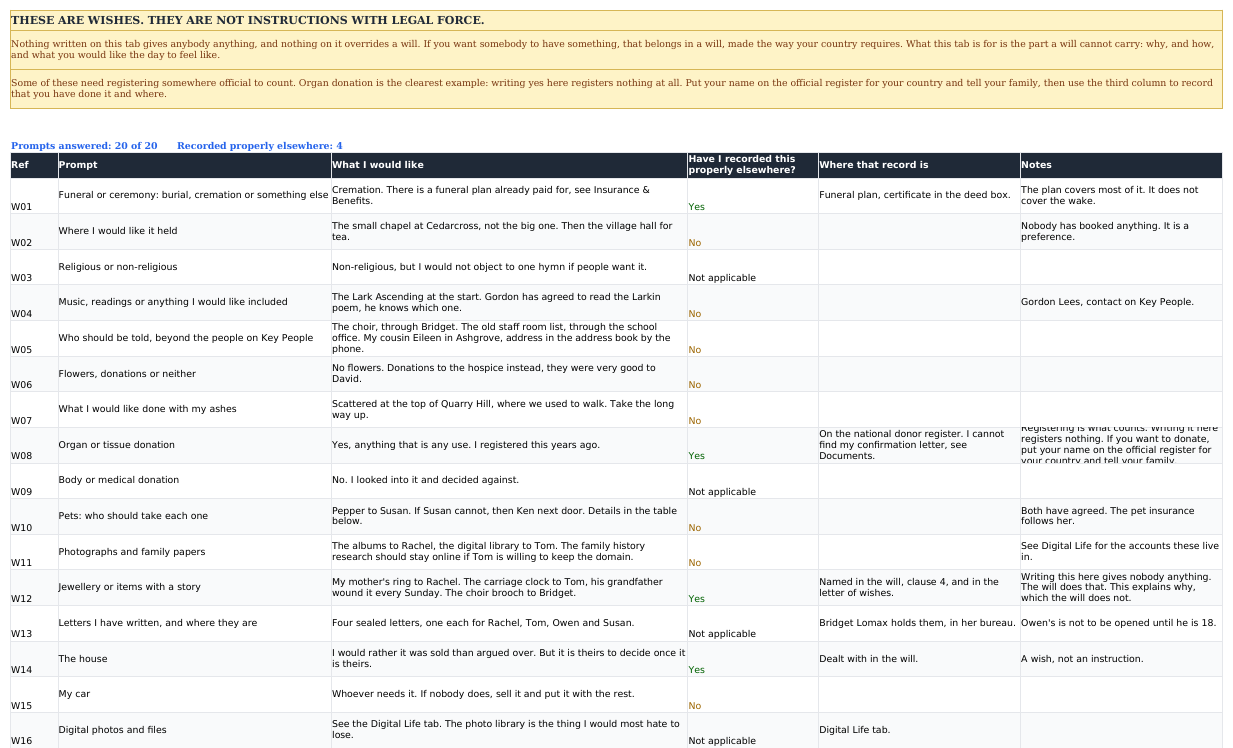
Twenty prompts with the answers left to you: the ceremony, the music, the ashes, the pets and who has agreed to take them, the letters you have written and who is holding them. A column asks whether each wish is recorded somewhere that actually counts, because organ donation is registered on a register and nowhere else.
13. Review Log
60 rows, one line a year. What you looked at, what changed, what is still to do, and the next date you have set yourself. An organiser three years out of date sends people to a bank you closed, which is worse than no organiser at all.
14. Summary
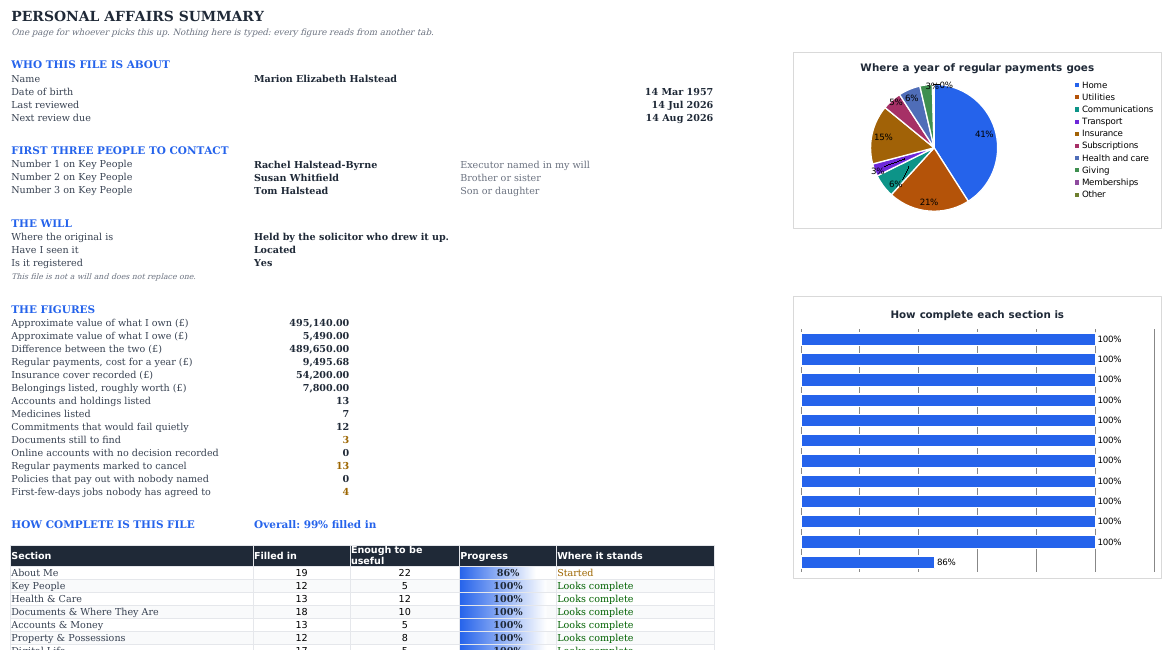
One page somebody could read in five minutes: your name, the first three people to call, where the will is kept, the figures, two charts and a meter showing how far through the file you are. Nothing on it is typed. It reads the other thirteen tabs.
A look inside
The workbook as it downloads, filled in for a fictional person. Every name, place and figure in it is invented, and no real company is named anywhere.
Specifications
| Format | One .xlsx workbook, about 92 KB |
|---|---|
| Tabs | Fourteen: Instructions, About Me, Key People, Health & Care, Documents & Where They Are, Accounts & Money, Property & Possessions, Digital Life, Regular Payments, Insurance & Benefits, If I Lose Capacity, Wishes & Notes, Review Log, Summary |
| Capacity | 22 personal fields, 60 people, six health tables covering 10 contacts, 12 conditions, 15 medicines, 8 devices, 8 carers and 10 health documents, 60 documents, 60 accounts, five property tables covering 7 properties, 12 keys and meters, 6 vehicles and 22 belongings, 60 online accounts, 60 regular payments, 50 policies, four capacity tables of 15, 15, 12 and 12 rows, 30 wishes prompts, 60 review entries |
| Works in | Excel 2016 and later, Microsoft 365, Google Sheets, LibreOffice Calc |
| Macros | None. Nothing to enable, nothing to trust |
| Formulas | SUM, SUMIF, COUNTA, COUNTIF, COUNTIFS, INDEX, MATCH, VLOOKUP, ROUND, TODAY, all plain and readable |
| Charts | Two on the summary: where a year of regular payments goes, and how complete each section is |
| Currency | Pick one from a dropdown on the Instructions tab (EUR, GBP, USD, CAD, AUD, CHF, SEK, NOK, DKK, PLN, NZD) or type your own symbol. Every money heading follows it; the amounts stay plain numbers |
| Dates | Every date is one you type. Nothing counts down to a deadline the file has assumed |
| Sample data | A fictional person, with cell-by-cell clearing instructions |
| Language | English |
| Delivery | Not on sale yet. When checkout opens: instant download after payment |
| Price | €12 one-off. No subscription and no renewal |
Honest limits
- It is not a will and does not replace one. Nothing you write in it disposes of anything.
- It appoints nobody. Naming a person here does not make them your executor, your attorney or your next of kin.
- It contains no legal, tax or financial advice, and no deadline or rule of its own.
- It is not a password manager and must never be used as one. Record where the password lives, not what it is.
- Filled in, it is a sensitive document. Put a password on the file and keep it somewhere you control.
- Charts and colour rules survive the Google Sheets import, but give them a glance afterwards.
- It is a spreadsheet, not software. No reminders, no sync, no encryption beyond what your spreadsheet app provides.
- No reviews yet. The product is new, and the screenshots above are the whole pitch.
Questions
Is this a will?
No. Writing something on these tabs gives nothing to anybody. Only a valid will, made the way your country requires, can leave anything to anyone, and if this file and your will ever disagree, the will is what happens. Use this alongside a will, not instead of one.
Should I put my passwords in it?
No, and the workbook is built to stop you. Never type a password, a PIN, a card security code, a safe combination or a recovery phrase into it. Write down where those things live instead: which password manager you use, where the recovery kit is kept, who you have set up for emergency access. Account numbers go in as the last four characters only.
Where should I keep the file?
Put a password on it and keep it somewhere you control: your own computer or an encrypted memory stick, not a shared folder and not an email attachment. Then tell one person you trust that it exists and how to open it. A file nobody can find helps nobody, and a file everybody can read is worse than no file at all. The Instructions tab covers both steps.
Does it work outside the UK, or outside the US?
Yes. There is no jurisdiction anywhere in it. No deadline, no rule, no threshold, no legal form and no named institution. Every date is one you type and the currency is a dropdown. It asks questions about your own life and records your own answers, which is the same everywhere.
Does it really work in Google Sheets?
Yes. File → Import → Upload, then Replace spreadsheet. Formulas, dropdowns and charts come across. Check the conditional-formatting colours afterwards, because Sheets occasionally reinterprets a rule. LibreOffice Calc opens it directly.
Are there macros?
None. It is a plain .xlsx built from SUM, SUMIF, COUNTA, COUNTIF, COUNTIFS, INDEX, MATCH, VLOOKUP, ROUND and TODAY. Nothing to enable, and no security prompt to click past.
Does it arrive full of sample data?
Yes, on purpose. A fictional person is filled in throughout, 12 people, 23 documents, 13 accounts, 17 online accounts, 27 regular payments, 8 policies, 20 answered wishes prompts and a year of monthly reviews, so every formula, chart and colour has something to show before you type a word. Clearing it takes about a minute and the Instructions tab lists the cells.
How is this different from the Estate Executor Organizer?
Same subject, opposite side of it. The executor workbook is for the person settling an estate: an inventory at date of death, a ledger, debts, distributions. This one is for the person planning ahead, writing down their own facts so nobody has to reconstruct them. Plenty of people end up with both, usually in that order.
Can I fill it in for my mother or father?
Yes, and it is a common way it gets used. Sit down together with a laptop. The tab order works as a conversation: who to ring, where the papers are, what comes out of the account each month. They answer, you type.
What if it will not open, or a formula looks wrong?
Email support@vendwright.com and say which tab and which cell. Refund terms are on the refunds page.
Get the workbook
€12, one file, instant download once checkout opens. Fourteen tabs and a fictional person already filled in, so you can see what a finished one looks like before you start your own.
€12 one-off · .xlsx · no macros
An organiser, not a will and not legal advice. It records what you already know about your own life.